

How to Organize Your Email Inbox
In this article
- Familiarize yourself with email apps and programs
- Use folders and set up rules to categorize emails
- Managing multiple email accounts? Try mail forwarding
- Structure your email time
- Regularly unsubscribe from newsletters you never read
- Learn to identify phishing and scam emails
Many high school and college students juggle multiple responsibilities outside of school, like jobs, clubs, and other extracurricular activities. Having an organized email inbox will help you make sure you’re on top of things like assignment deadlines, changes to your work schedule, or updates about a club you’re in. In this article, we’ll show you how to organize your email inbox!
Don’t miss out on emails from Get Schooled! Sign up to receive free college, scholarship, and jobs resources directly to your inbox.
Familiarize yourself with email apps and programs
The first step to organizing your email is to familiarize yourself with the email apps or platforms available on your mobile device, such as Gmail, iCloud, and Microsoft Outlook.
On your mobile device, take the time to explore different functions of the email app you’re using, including how to write, send, reply, forward, or delete an email. Other functions that may be available on a mobile device include gestures for quick actions (like swiping left or right to quickly delete a message), setting notifications, or using the search function to quickly find an email.
On your computer, you can organize your emails even further. for example, creating filters or rules helps sort incoming messages and prevents your inbox from getting too cluttered. You can also customize your settings to have new or flagged emails shown at the top of your inbox, which can make sure important messages aren’t getting lost. Lastly, check out specific tips tailored to applications like Gmail or Outlook so you can get the most out of the features and customize your inbox to work for you!
Use folders and set up rules to categorize emails
Have you ever struggled to find a specific email in your inbox and wished there was a better way to keep things organized? Setting up folders or labels is a great way to categorize and sort your messages, preventing important information from getting lost. Examples include:
- Folders for each term of school (i.e. “Fall 2026”), with sub-folders for each class (i.e. “COMM 101″).
- Folders for your extracurricular activities.
- One folder for internship updates.
- One folder for work updates.
- One folder for general school updates.
- One folder with important information on college or scholarship applications.
- …and more!
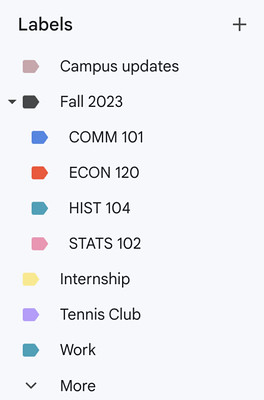
After creating your folders, you can set up rules or filters to automatically sort your emails, basically breaking down your inbox into several smaller, more manageable inboxes. It may take a few tries to figure out a system that works for you, but once you find the right setup, your email organization will be simple!
Managing multiple email accounts? Try mail forwarding
While most schools set up an email account for you in their system, you may also have a separate account for personal use. It can be confusing to switch between and keep track of different accounts, so we suggest you set up email forwarding. This setting works by sending all of your messages from different accounts into one inbox, so you can easily read and respond to everything in one place. for example, you can choose your personal email as your main inbox, then go into the settings of your school email account to enable mail forwarding.
Structure your email time
Some students find themselves spending a lot of time reading and replying to emails, while others have so many unread messages that they avoid checking their inbox at all. If either of these sound like you, there are several ways to structure your time so that you can tackle your inbox bit by bit. One strategy is to check your emails only when you have time to respond. Another strategy is to schedule your email sessions, either in one long stretch of time or in shorter periods throughout the day, depending on what works best for you. Using the OHIO (Only Handle It Once) method is another way to effectively manage your inbox. by following this method, you deal with an email in the moment: replying to it, organizing it into a folder, or deleting it right away.
Regularly unsubscribe from newsletters you never read
Regularly unsubscribing from newsletters you never read is another way to keep your inbox organized. to unsubscribe from most newsletters, look for the “Unsubscribe” link usually located at the bottom of the email, click on it, and follow the instructions to complete the process. You can do this whenever you check your emails, or by setting a dedicated time to only focus on reviewing your subscriptions and unsubscribing from any that don’t interest you.
Learn to identify phishing and scam emails
It’s important to know how to spot phishing and scam emails because they can be dangerous and put your online security at risk. to identify spam, look for things like long email addresses, messages with lots of grammar mistakes or typos, or urgent requests for personal information (like your birthday, Social Security number, or address). Most importantly, do not open emails with unexpected attachments or links, especially if it’s from a person or organization you don’t know. Regularly checking your spam or junk folder is also important, since important emails can end up there by mistake. to avoid getting spam emails in the future, be careful about sharing your email address or any personal information online and only sign up for newsletters from websites you trust.
By making email organization a priority, you’ll be able to stay in the loop and be ready for anything that comes your way! Do you have any questions about keeping your email inbox organized? Connect with a Get Schooled Advisor.
Keep going

10 Things to Complete in Your First Term of College
Here’s a list of 10 things to complete in your first term of college.

How to Find Jobs & Internships in College
We show you how to find jobs and internships while in college.

How to Balance School & Work
We share tips for successfully balancing school and work!

How to Write a Professional Email
In this article, we share examples of professional emails.